

Record and replay in 3D
Save any match with one click, then watch it again on a 3D table: cards, attacks, abilities, counters and life totals, step by step. The first 3D replay for MTG Arena, free and running in your browser.
Free deck tracker for MTG Arena
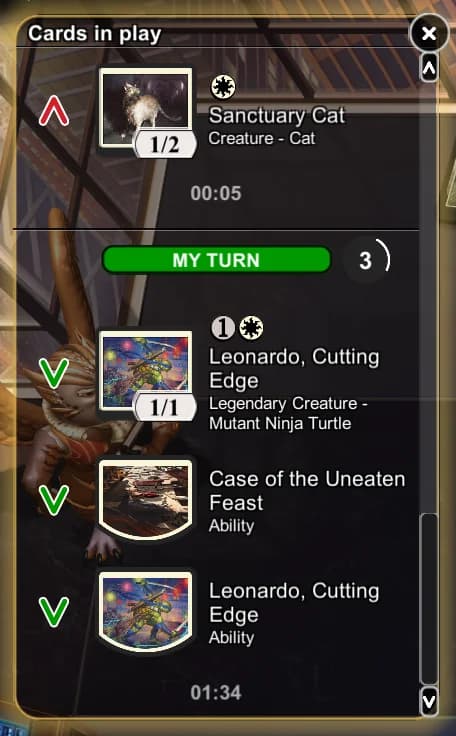
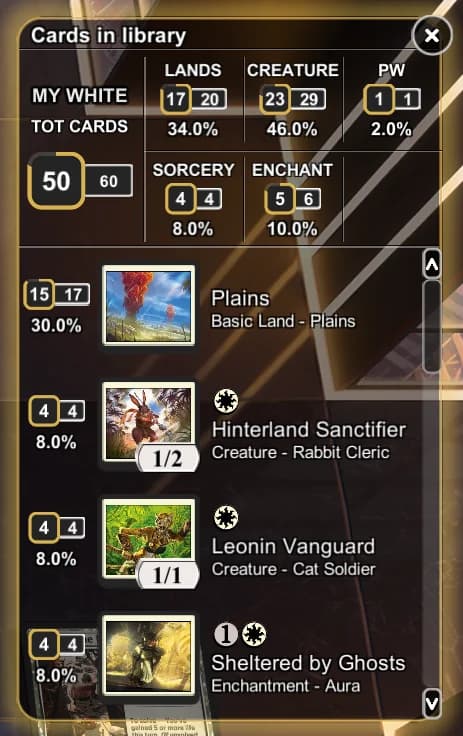
AvSoFt Mod adds two smart panels on top of Magic: The Gathering Arena: a complete history of played cards and activated abilities, real-time deck tracking, always in sync with what's happening in the match. And you can record your games and watch them again as a 3D replay.
New: the 3D replay
Every game you record becomes a replay you can walk through in 3D: cards flying onto the battlefield, attacks, abilities, counters and life totals, step by step, exactly as it happened. It is the first 3D replay for Magic: The Gathering Arena, and the best way to understand a match you thought you had already understood.


Open the viewer, drop in a game recorded with AvSoFt Mod and press play. Haven’t recorded one yet? There’s a demo match ready and waiting. The 3D replay is completely free, with no limits and no account to create: it runs in your browser, there is nothing to install, and your match file never leaves your computer.
What changes in your matches
Save any match with one click, then watch it again on a 3D table: cards, attacks, abilities, counters and life totals, step by step. The first 3D replay for MTG Arena, free and running in your browser.
Complete history of the entire stack: played cards and activated abilities, yours and your opponent's, with turn-start markers and duration timers. Also recognizes cards put into play by an effect, not just the ones cast by hand.
Automatically identified deck, real-time remaining card count, draw probabilities, a summary by type, and the cards that left your library face down. Updates itself even after a sideboard change between games.
Click a thumbnail in either panel to open the game's native "examine card" zoom, even for cards no longer in play. A huge advantage in Draft, where your deck comes together on the fly by opening packs full of cards you've often never seen before: while you're in a match you can study them one by one, any time.
The panels automatically hide during a card zoom or the stack view, and reappear right after, never in the way. And next to the close button each one has a button that makes it 30% smaller: your choice is remembered even after you close the game.
Fixes the annoying bug where MTG Arena reverts to windowed mode on every scene change on ultrawide monitors.
Always evolving
AvSoFt Mod doesn't just show two panels: it organizes in real time information you already have in front of you, so you can decide faster and with less effort. History, deck, and probabilities are always within a glance, never a click away. And it's a living project: it evolves match after match, with new features designed by someone who actually uses the mod every day.

Watch a real Magic: The Gathering Arena match with both panels active, exactly what you'll see when you play.
When a card gets taken from you
Gonti, Agent of Raffine, Black Cat: your opponent takes a card from your library face down, and for the rest of the match it stays a mystery. The deck panel now shows you exactly which cards your library has lost.

Your opponent takes two cards away. The badge turns red: you know how many you lost, not which ones.

Any search through your library, for any reason, and the badge blinks green: now it knows which ones they are.

One click opens the list: the two cards with their real artwork.

A third card leaves after the search: it stays a question mark until another library search reveals it.
There is nothing hidden in this deduction. You built the deck yourself, and the game opens your library every time a card sends you searching through it: from that moment on it is a subtraction, the one you could never do by hand within Arena's timers. It works for any card that left the library without showing itself, including the ones exiled by your own cards.
What the mod will not do is guess. Cards that leave the library after the search stay question marks until a new search identifies them.
This feature came from a suggestion by a user on our subreddit, and it shipped two days later. If you have an idea for the next one, that is the place to write it.
Our official subreddit on Reddit: r/AvSoftModNo secrets, no risk
No hidden game data is ever read: only information already visible to the player, organized better.
The installer automatically finds your MTG Arena folder (Steam, Epic Games, or the official Wizards site) and sets everything up in one click.
No extra setup needed and no account to create: the plugin activates itself automatically when the game starts.
Both panels appear automatically in your matches, ready to use. You can collapse them whenever you want.
Press the record button during a match: when it ends, the game is saved on your computer, and you can watch it again as a 3D replay in your browser, step by step.
Want to go back? Just uninstall it from Settings → Apps → Installed apps, exactly like you would with any other program: the game instantly returns to its original state.
Enter your matches stronger
Available for Windows only
On first launch, Windows might show a SmartScreen warning: AvSoFt Mod is distributed for free, without a paid code-signing certificate. This is normal for an independent project like this one, nothing to worry about. Just click "More info" and then "Run anyway" to proceed.
Like the project? Support it with a donation →Visit the GitHub page to see all versions →The community
300+
Total downloads
5K+
Matches played
17,304
Click as many times as you want!
How high can you push it?
Free plugin
AvSoFt Mod is free and I develop it in my spare time, out of passion. If the plugin is useful to you and you'd like to say thanks, a free donation is always welcome and helps me keep maintaining and improving it. And if you'd like, you can also leave me a message in the donation note to report a bug or suggest a new feature. Thank you for your support.
Buy me a coffee or a beer
You can leave a message in the donation note if you'd like to tell me something.


